
MWAA provisioned or Serverless: cutting the bill without breaking operations
A provisioned MWAA environment bills every hour it exists. MWAA Serverless bills per task. What each option costs you, the limits that decide between them, and the practices that keep both cheap.
A common request from data teams: production Airflow must run around the clock, but dev and staging only need to be up during working hours. With Amazon MWAA, the answer depends on which deployment option you run.
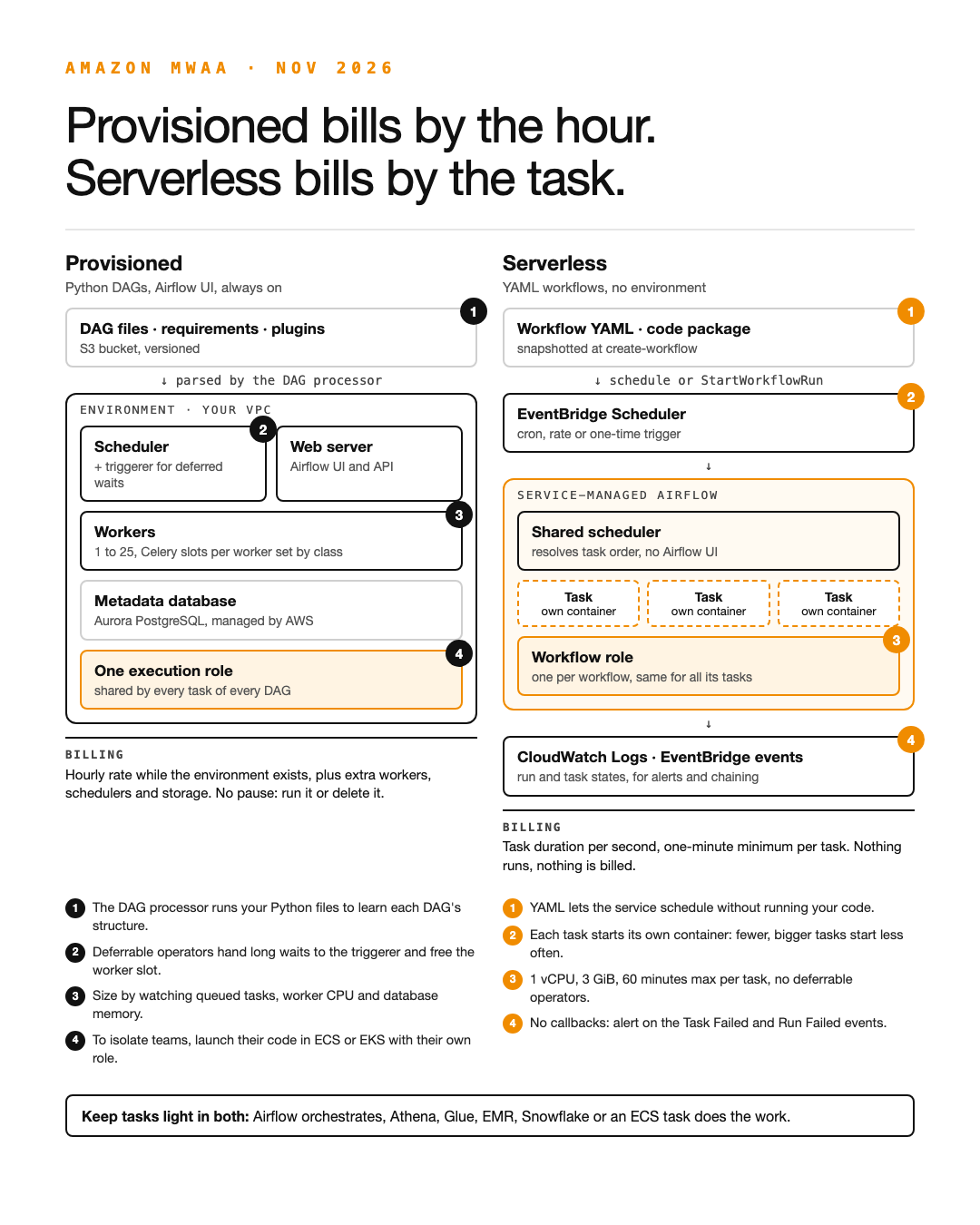
What you pay for
Provisioned MWAA is Airflow as you know it: scheduler, workers, web server and an Aurora PostgreSQL metadata database, run by AWS in your VPC. You pay an hourly rate for as long as the environment exists, whether a DAG runs or not. A small environment costs $0.49 per hour in us-east-1, about $365 for a 31-day month. On top of that, you pay for workers added by autoscaling, extra schedulers and web servers, and metadata storage. There is no pause button: an environment is either running or deleted.
MWAA Serverless has no environment. You submit a workflow, EventBridge Scheduler starts it, and each task runs in its own container that is released when the task ends. You pay for task duration, billed per second with a one-minute minimum per task. Nothing runs, nothing is billed.
So "managed but not serverless" is a fair description of provisioned MWAA. AWS manages the servers, but they stay on.
Cutting the cost of provisioned environments
Start by having fewer environments, then make the remaining ones smaller.
- —Develop locally. AWS publishes the Docker images MWAA runs in production. They start a full Airflow on a laptop, with no AWS account required, and catch import and dependency errors before upload.
- —Keep one shared non-production environment instead of one per stage or per team.
- —Size it down. The
mw1.microclass runs the scheduler and the worker in one container (1 vCPU, 3 GB). It handles 3 concurrent tasks and up to 25 DAGs, with no autoscaling. That's enough for functional testing, not for load testing. - —Delete it at night and recreate it in the morning. AWS publishes a sample that exports the metadata to S3, deletes the environment, then recreates it on a schedule. On their small environment used 12 hours on weekdays, the bill goes from $357.80 to $123.48 a month. Creation takes 20 to 30 minutes, so the morning job must start early. Set
catchup=False, otherwise the scheduler replays every missed run when the environment comes back. Keep connections in Secrets Manager rather than in the metadata database. - —For a staging environment used only before releases, create it from CI and delete it afterwards, without exporting the metadata.
Sizing a provisioned environment
Each class sets a default number of concurrent tasks per worker and a DAG capacity:
- —
mw1.micro: 3 tasks, 25 DAGs - —
mw1.small: 5 tasks, 50 DAGs - —
mw1.medium: 10 tasks, 250 DAGs - —
mw1.large: 20 tasks, 1,000 DAGs - —
mw1.xlarge: 40 tasks, 2,000 DAGs - —
mw1.2xlarge: 80 tasks, 4,000 DAGs
Above micro, workers scale from 1 to 25, and celery.worker_autoscale changes how many tasks each worker runs. CloudWatch publishes two namespaces: AmazonMWAA for Airflow metrics, and AWS/MWAA for the containers, the task queue and the database. Read them this way:
- —Tasks pile up in the queue (
QueuedTasks,ApproximateAgeOfOldestTask): not enough slots. Add workers or move up a class. - —Workers saturate CPU or memory with few tasks running: something computes on the workers. Move that work out rather than buying a bigger environment.
- —The scheduler is busy and DAG parsing is slow: too many DAGs, or heavy code at the top level of DAG files.
- —Free memory on the database is low: clean old history with
airflow db clean. - —One worker, low CPU, empty queue all day: drop a class.
Keep tasks light
Airflow should orchestrate, not compute. A task that runs pandas on a worker fills its memory and forces a larger class for every DAG in the environment. Send the work to an engine that scales on its own: Athena, Glue, EMR, Snowflake, or an ECS task with its own image and memory. dbt fits the same pattern: run it in a container with EcsRunTaskOperator or KubernetesPodOperator, so its version and dependencies don't touch the Airflow environment.
For tasks that wait on an external job, use deferrable operators (deferrable=True). The task starts the job, then hands the wait to the triggerer, a separate process that watches hundreds of waits at once. While a Glue job runs for 40 minutes, no worker slot is used. A sensor in poke mode holds a slot for the whole 40 minutes.
MWAA Serverless: the limits that decide
Serverless removes the hourly bill, but it isn't the same Airflow. From the documentation:
- —Workflows are YAML (DAG Factory format). Airflow runs a Python DAG file to learn its structure. A shared scheduler can't run every customer's code, so the service reads a declarative format instead. A converter turns Python DAGs into YAML, but it freezes any logic resolved at parse time.
- —A task runs for at most 60 minutes. An operator that waits for a two-hour Glue job fails. Start the job without waiting and split the watch, or keep that pipeline on provisioned.
- —Deferrable operators aren't supported. A waiting task keeps its container, inside the 60-minute limit.
- —Several Airflow features are ignored:
catchup, failure and success callbacks,trigger_rule, pools,depends_on_past, SLAs. Retries are capped at 3, with at most 300 seconds between attempts. Alerting goes through the run and task events MWAA Serverless sends to EventBridge. - —Each task gets 1 vCPU and 3 GiB, Python 3.12 on Linux x86_64, Airflow 3.0.6. Tasks have no internet access unless you attach a VPC that has it.
- —There is no Airflow UI. Monitoring goes through the console, CloudWatch Logs and EventBridge.
- —Quotas: 100 workflows and 100 concurrent runs per account, 20 concurrent runs per workflow, 100 KB of XCom data.
Two November 2026 releases removed earlier blockers: provider and custom operators (Snowflake, dbt, HTTP or your own BaseOperator subclass, shipped in a code package) and connections and variables from Secrets Manager or Parameter Store.
Design Serverless tasks for per-task billing
Each task starts its own container and is billed at least one minute. A DAG of seven 20-second tasks is billed seven minutes for two and a half minutes of work, and waits for seven container starts. Fewer tasks that each delegate a whole step cost less and finish sooner. The trade-off: a retry reruns a bigger block, and the logs point to a coarser step.
Choosing between them
- —Serverless fits environments that are idle most of the day, pipelines made of AWS service calls that each finish within an hour, and teams that need a separate IAM role per workflow.
- —Provisioned fits busy production environments, long waits that deferrable operators make free, teams that run operations from the Airflow UI (reruns, backfills), and DAGs that depend on callbacks, pools or trigger rules.
- —Mixing both (Serverless for dev, provisioned for production) saves the most money but means your tests no longer run the code that runs in production. Only do it if the workflows themselves are portable.
One environment per team?
Usually not. The multi-team mode of provisioned MWAA (Airflow 3.3.1 and later) gives up to 20 teams their own DAG folder, connections and variables in one environment, mapped to IAM Identity Center groups. It isolates people, not code: every task still runs with the environment's single execution role, and plugins and requirements are shared.
To narrow AWS permissions, keep MWAA as the orchestrator and run each team's code in ECS tasks or EKS pods with that team's IAM role. The shared execution role only needs to start those tasks and pass those roles. Any DAG in the environment can still start any team's task, so code review and naming conventions enforce who runs what. When that isn't enough (sensitive data, a hard IAM boundary), give the team its own environment: you pay its hourly rate. The same applies to a different Airflow version, a different network or incompatible dependencies.
On MWAA Serverless, the role is set per workflow: all tasks of a workflow share it, and two workflows can have different roles in the same account.
Sources
- —Amazon MWAA pricing
- —Environment classes, Amazon MWAA documentation
- —Container, queue and database metrics, Amazon MWAA documentation
- —What is Amazon MWAA Serverless?, AWS documentation
- —Running custom code with Python, Bash and custom operators, AWS documentation
- —Quotas for Amazon MWAA Serverless, AWS documentation
- —Introducing Amazon MWAA Serverless, AWS Big Data Blog
Working on agents in production on AWS?