
Deep Dive into AWS Lake Formation
From an S3 data lake to fine-grained access control
This is the first post of a new series of deep dives into the AWS services that power data and AI platforms. Every post, we spin the wheel and go deep on whichever service comes up. Today’s winner is AWS Lake Formation one that quietly runs a lot of data platforms behind the scenes, and worth understanding properly. If that sounds like your kind of read, subscribe because more of these are coming.
Access Management on AWS
The storage layer of a data platform on AWS is almost always S3. Sure you may use Redshift as a warehouse without having any S3 blueprint, but most of the time you have either a datalake or a lakehouse + eventually a warehouse. So “data access management” at some point means controlling who reads which objects or part of these objects in S3.
On AWS, when dealing with resource access management, you’ll most of the time hear about resource policies and IAM. Your cloud platform administrator will likely also mention SSO (aka IAM Identity Center) and SCPs. But there is a service dedicated to data people, launched in 2019, still quietly running a lot of customer data platforms on AWS: AWS Lake Formation. Let’s have a look at what this service solves and how it works.
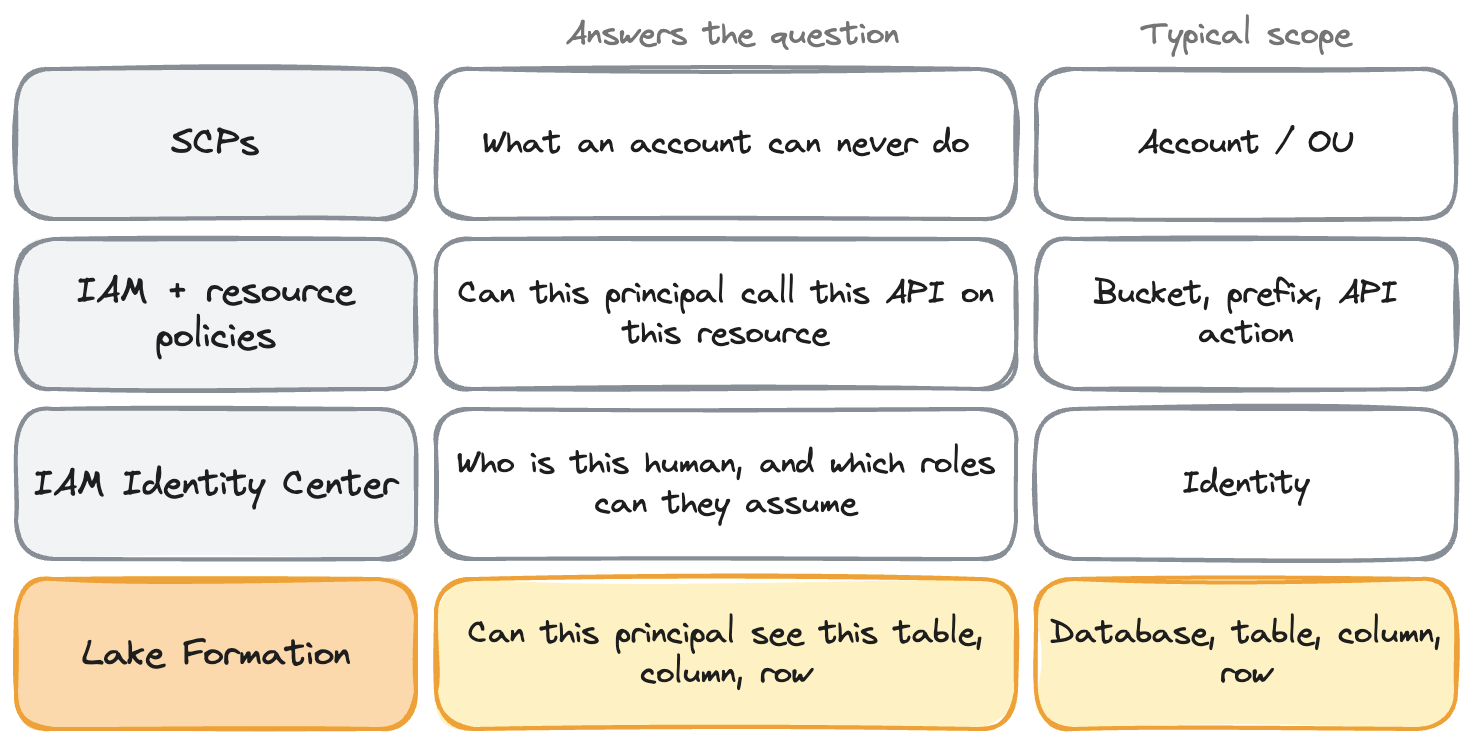
Each answers a different question.
- SCPs are guardrails: what an account can never do, do not grant anything.
- IAM and resource policies answer “can this principal call this API on this resource”. It’s great for infrastructure, and fine for a data platform with a handful of shared roles (”this team reads this prefix”).
- Identity Center answers “who is this human and which roles can they assume”.
But the moment your rules talk about databases, tables, columns and rows instead of buckets and prefixes, that’s Lake Formation territory.
When IAM isn’t enough for a data platform
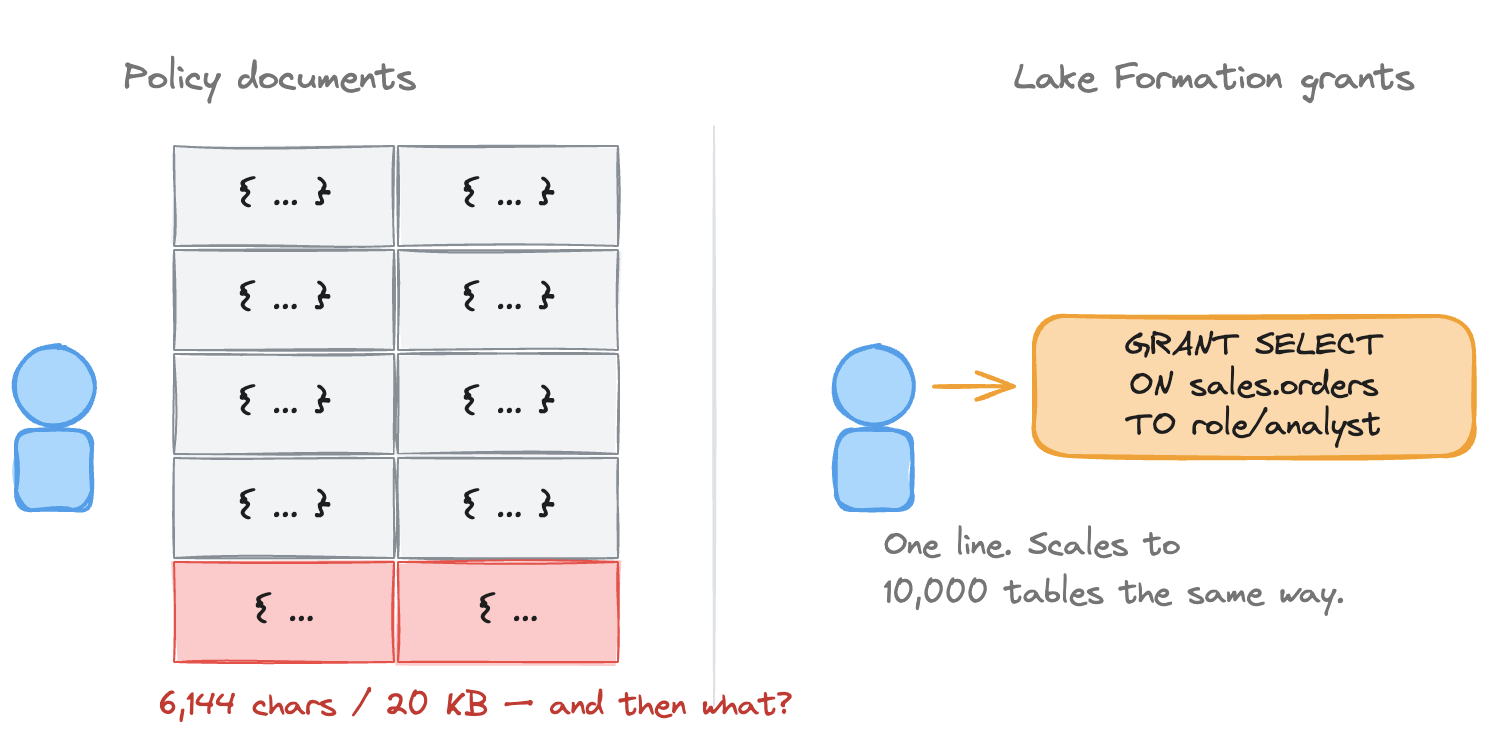
IAM and S3 speak in buckets, prefixes and API actions; a data platform speaks in databases, tables, columns and rows. “But IAM does know about tables”. Fair, you can write a policy on Glue Data Catalog objects (glue:GetTable, glue:GetDatabase, scoped to a table ARN). Two things it still can’t do.
- Glue only governs the metadata layer (the catalog API) but not the data itself. The underlying S3 objects are a separate authorization you need to set up too on the table location. So Glue permissions alone are not enough.
- And it stops at the table: IAM has no notion of a column, a row, or a cell. So the question “can this analyst read three columns of this table, not the PII ones, and only the rows for their country?” has no expression in IAM or a bucket policy.
Another problem is size and count. Once you have 1,000 databases, 10,000 tables, and 5,000 users across 100+ teams, per-user or per-team access runs into some caps: S3 bucket policies max out at 20 KB, IAM policies, whether managed (6,144 characters each, up to 25 per role) or inline (10,240 characters total per role). One shared role per team works at first and it holds as long as the team is your finest access boundary. But scale the platform enough, and you hit a wall.
What Lake Formation actually does
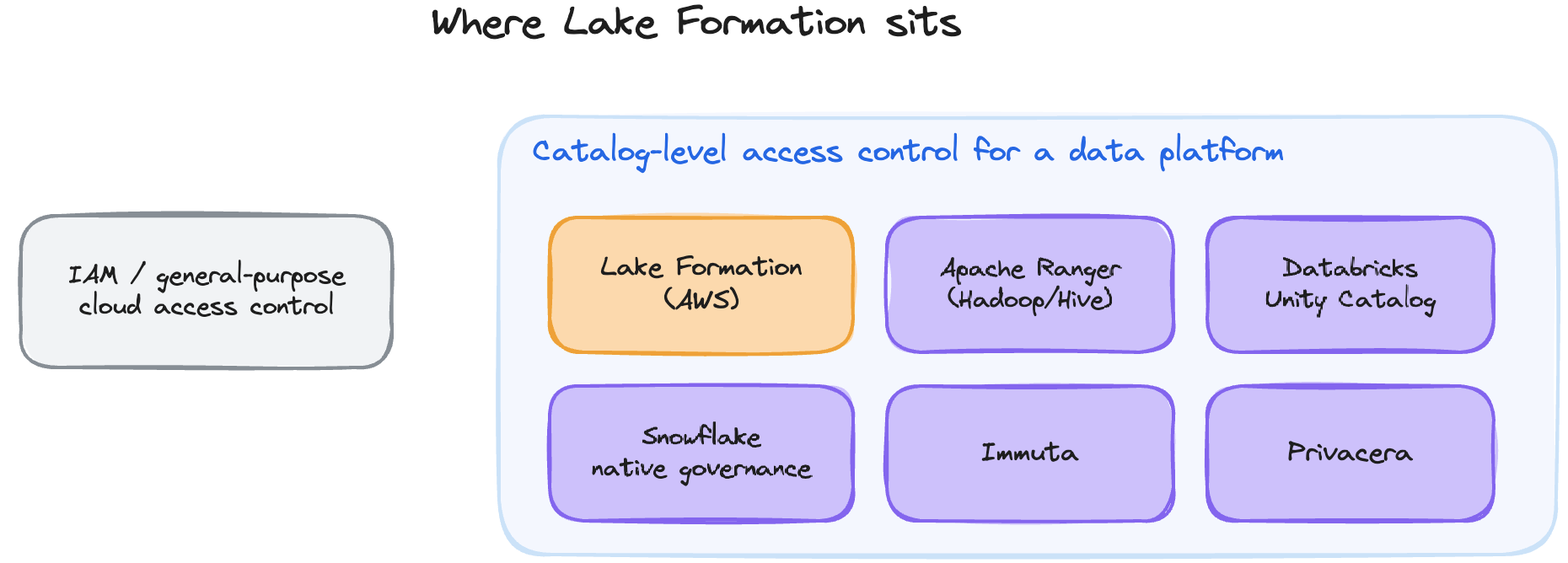
Lake Formation is a data access management solution purpose-built for governing data lakes and lakehouses at scale on AWS. It implements data mesh principles because it keeps a single central catalog and grant model while letting each domain stay the actual owner of its data and permissions (delegated administrators, tags scoped per domain). It sits in the same category as Apache Ranger (Hadoop/Hive), Databricks Unity Catalog, Snowflake’s native governance, or third-party layers like Immuta and Privacera: fine-grained, catalog-level access control for a data platform, not a general-purpose IAM system.
To understand deeper how it works, let’s start with the case that’s 90% of why anyone touches Lake Formation: a data lake or Lakehouse on S3. The whole loop:
You have a bucket of Parquet or CSV files, s3://acme-lake/sales/, with a Glue Data Catalog table orders on top. Today, whoever can read that prefix reads everything. Handing it to LF means LF now sits between the query engine and S3: instead of IAM or a bucket policy deciding who reads what, LF holds the grants on the database, table, columns and rows, and it’s LF, not the engine, that decides and hands out the credentials to match.
Setting up Lake Formation
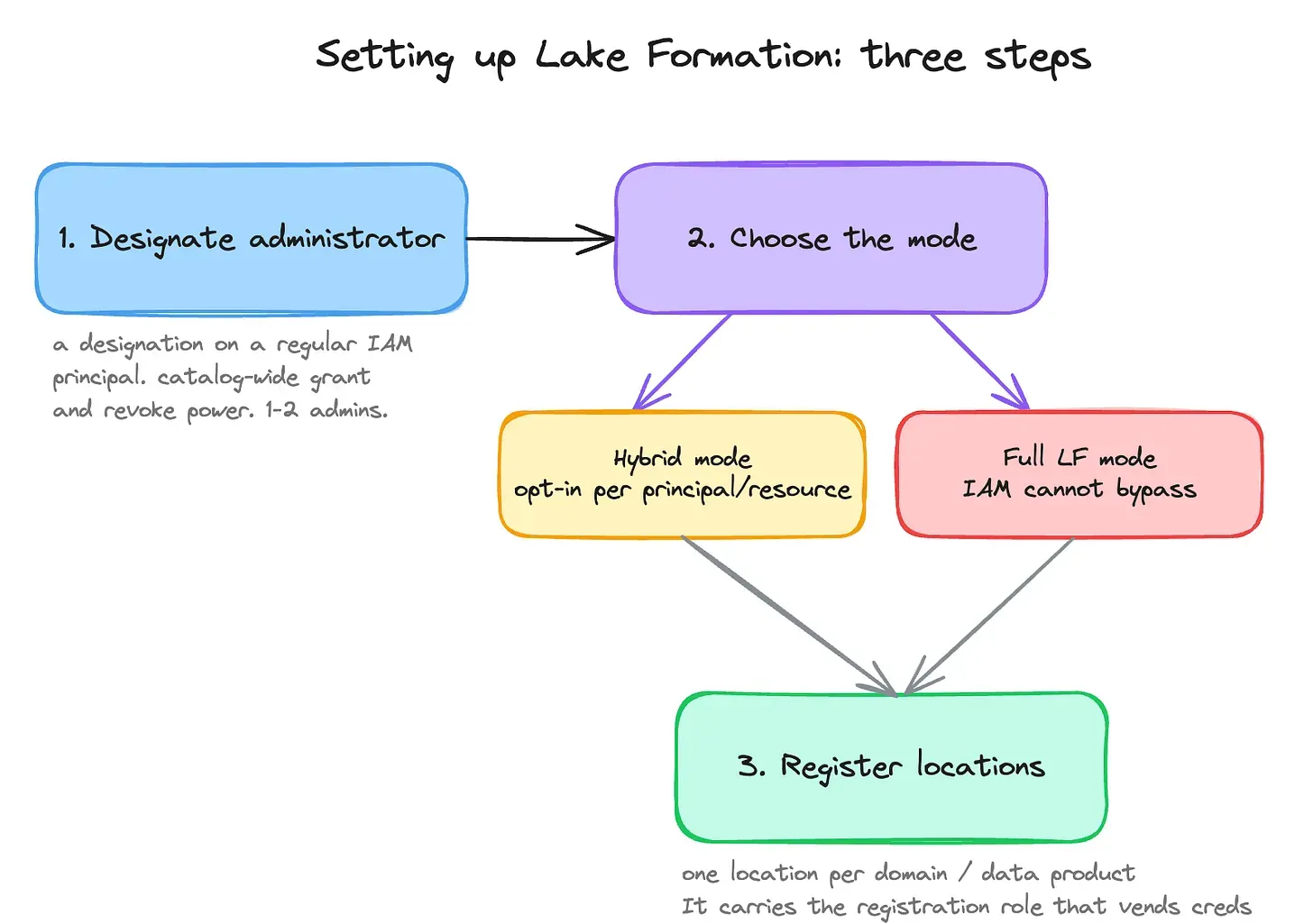
Setting up LF follows three steps: designate an administrator, choose the mode, register your locations.
First, the administrator: you designate a data lake administrator. It’s not a real IAM role LF creates, but a designation you apply to a regular IAM principal. That principal gets catalog-wide power: it sees every resource and can grant and revoke any LF permission on any of them. That doesn’t mean it hands out every permission itself day to day, but it’s rather the one who delegates. Something we often get questions about: how many data lake administrators to have? The answer to that is who does the day-to-day grants. Keep one or two admins (an IaC pipeline role, plus a human one), and let them delegate per domain without handing out that catalog-wide power.
Then, the mode: in hybrid access mode, Lake Formation enforcement is opt-in per principal and per resource. Principals you opt in go through LF permissions; everyone else keeps querying through their existing IAM permissions as if LF wasn’t there. That’s what makes it the right strategy to onboard on LF team by team, without a big-bang cutover. In full LF mode, all access to a registered location goes through LF and IAM can’t bypass. Under the hood, the IAM path exists because of a default grant to a virtual group called IAMAllowedPrincipals (“anyone IAM allows”) on every new database and table. On the resources you want LF to enforce, revoke it.
Then, registration: Registering an S3 data lake location turns on credential vending for the particular prefix. Each registration carries a registration role: an IAM role assumed by Lake Formation itself (Trust Policy, you named it) that holds the S3 and KMS permissions on that prefix and vends the temporary credentials to the query engines. Don’t confuse it with the administrator role: the admin decides who gets access, the registration role executes the granting process. The other question we often get: how should we decide which data locations to register? Same answer as for admins: follow your ownership boundaries. Register one location per domain or data product (the prefix that maps to one owning team, one registration role, one KMS key). So not too small (not per table, which causes pointless overhead), and not the whole bucket unless the entire lake really has a single owner.
There is actually one confusion we often hear about regarding data lake location: how different is it from another concept named data location? A data location permission (DATA_LOCATION_ACCESS) is a grant that lets a principal create or alter Data Catalog resources pointing at a specific path. Say for example you (through direct grant or LF Tags) granted one principal CREATE_TABLE on a specific database. He’ll automatically be able to access S3 and create files for tables under that database’s default location. But if you want him to create tables from data stored outside of this db prefix (perhaps a raw area of your lake, another team’s domain prefix, or a cross-account location) you need to grant him DATA_LOCATION_ACCESS on that other location too, without duplicating any data.
Granting access: direct grants or LF-Tags
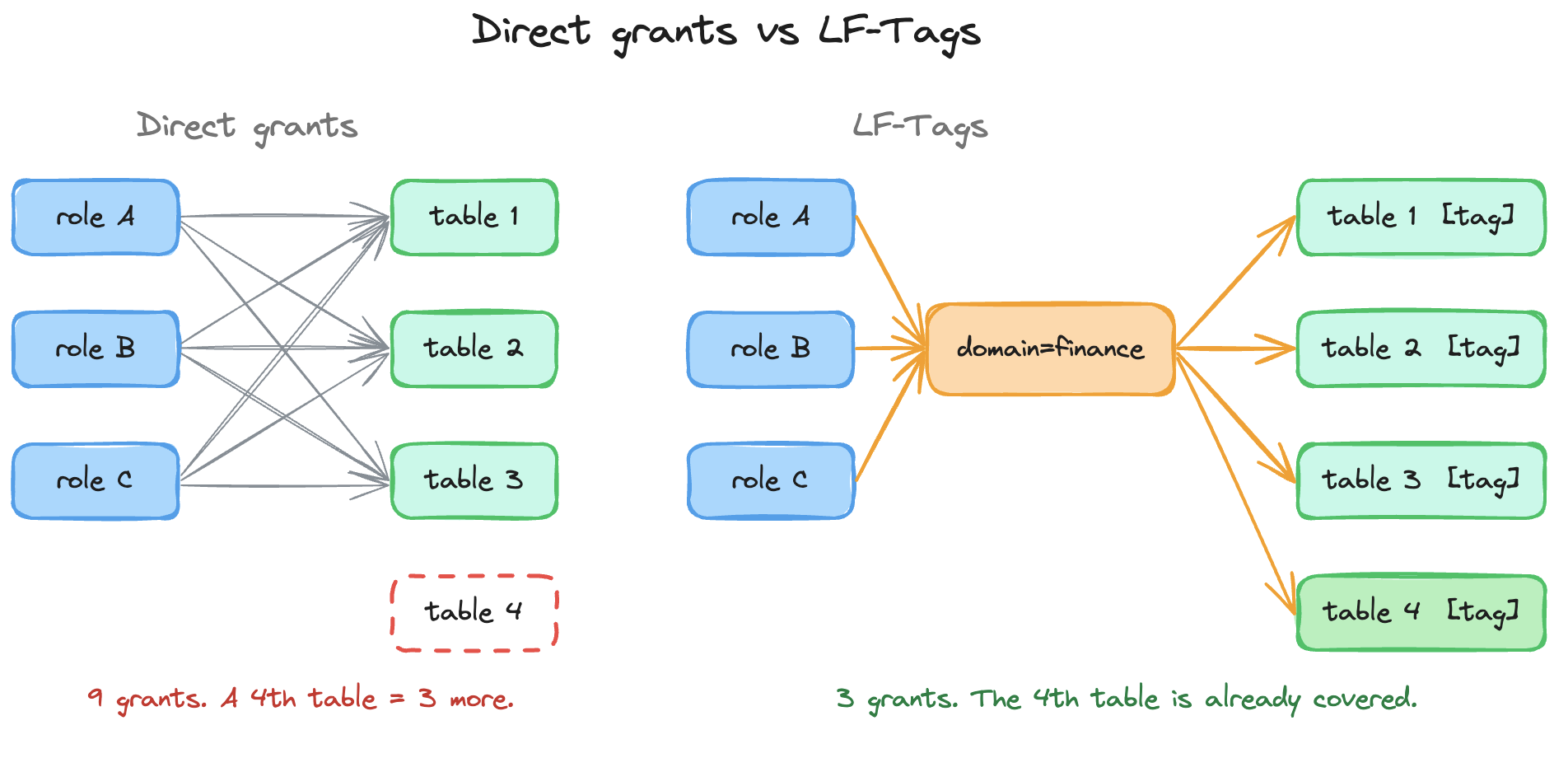
You create permissions through direct resource grants or LF-Tags. Direct grant is simple to understand: you pick a principal, pick a resource in your catalog, and grant that principal specific permissions on it. LF-Tags are the indirect version, and the recommended one because it scales better. You define tags (domain=finance, domain=marketing, or role-shaped ones like sensitivity=pii) and attach them to catalog resources. Then you grant a principal permissions not on a resource directly, but on a tag expression (domain=finance): the grant matches every resource carrying that tag, now and in the future. Tag the resources once, grant on the expression once, and a new table with the right tag is already permissioned. It’s attribute-based access control applied to your AWS data platform. All of it drives through console, CLI, CloudFormation and CDK.
How access gets enforced at query time
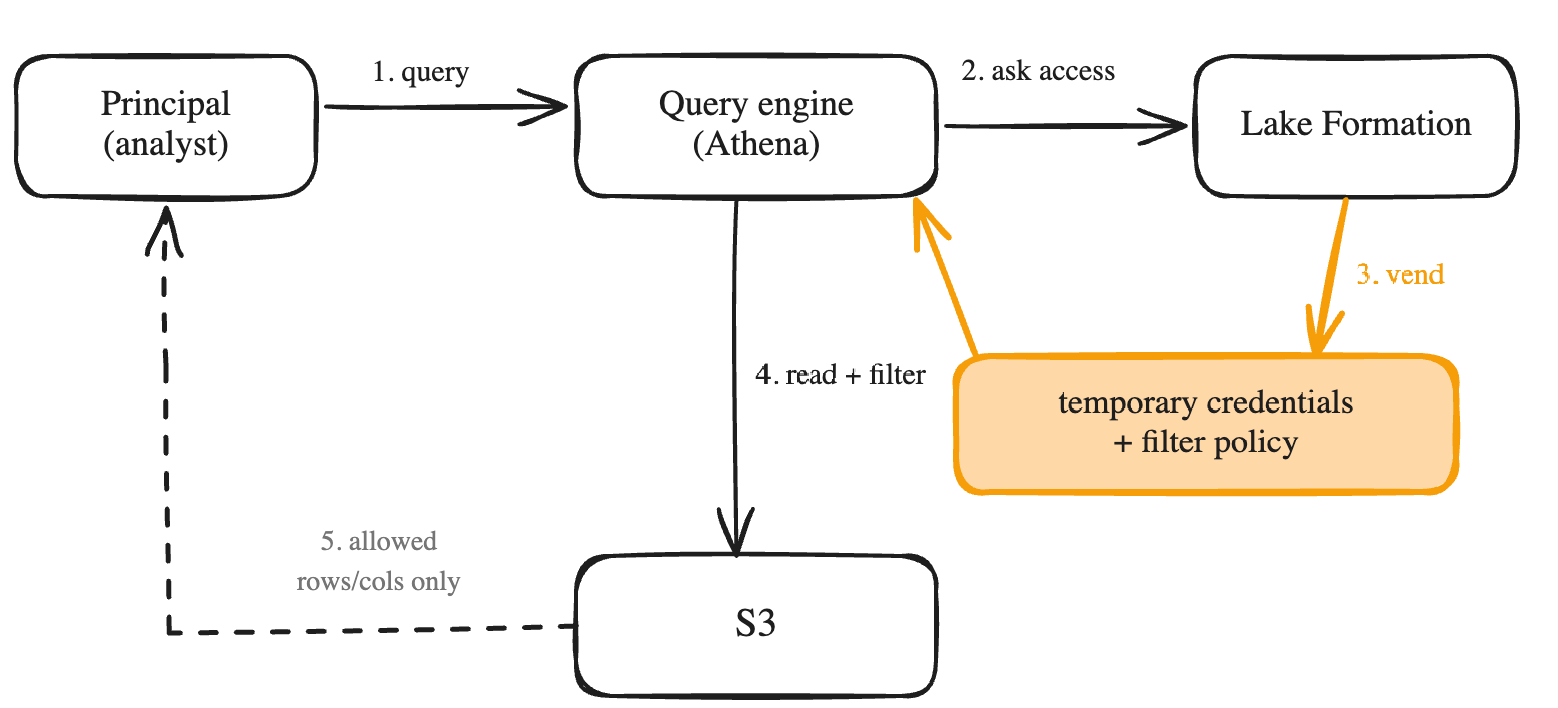
Here’s the mechanic the rest of the post leans on. So far we’ve covered how to set up LF, when it actually governs your data, and how to write the permissions. What we’ve taken for granted is how LF enforces those grants the moment a query runs. The flow, with Athena as the example:
- A principal sends a query to a query engine: here, Athena.
- Athena doesn’t decide for itself whether LF is involved: every catalog and data call on an LF-registered resource is authorized by LF automatically, so the engine goes through LF rather than reaching for its own S3 permissions.
- LF checks the grant. If it exists, LF vends temporary, scoped-down S3 credentials and, when FGAC is in play, a filter policy describing which columns and rows are authorized.
- Athena reads S3 with those credentials and applies the filter policy, dropping anything the grant doesn’t cover.
- The principal gets back only what the grant covers. If there is no grant, the query fails before it ever touches S3.
Beyond S3: Redshift, federated catalogs, S3 Tables
S3 is the main case, but LF can governs other Data Resources:
- Redshift datashares. A datashare is Redshift’s native way to share live, read-only data from a producer namespace to consumers without copying it (the consumer reads the producer’s storage). It works fine without LF, but if you share it via the Data Catalog, you opt it into LF governance, and that’s the interesting move in a data mesh approach: instead of managing Redshift-local grants on every consumer cluster, access to shared Redshift data runs through the same central grant model as the rest of your lake. The big steps: the producer creates the datashare and shares it via the Data Catalog; the data lake admin registers it in LF; the consumer accepts it, which materializes it as a federated database in their Glue Data Catalog and from there, the consumer-side admin grants on it like on any other database.
- Federated catalogs. The pattern we just saw with Redshift extends to other sources: you can federate external catalogs (Snowflake Horizon, Apache Polaris, Databricks Unity) and any Glue connection (DynamoDB, MySQL, ...). A quick reminder on what federation means: the Data Catalog gets a live pointer to the source’s objects, and no data is duplicated. The source’s data enters the same grant model as the rest of your lake. Something to keep in mind here, don’t take FGAC support as universal: check what your specific source and engine combination supports before promising column or row filters on it. So, when is going all-in on federation the right call? When the data is owned and served elsewhere but needs to be governed and joined here: an operational DynamoDB table your analysts need next to warehouse data, a Snowflake estate mid-migration, a partner’s Unity catalog ie. cases where the copy would exist only to re-create access control you can now apply in place. If a workload hammers the source or needs local performance, replicate instead; federation is for governance, not throughput.
- S3 Tables. One of these federated catalogs you can create is the S3 Tables one. S3 Tables are managed Iceberg tables in table buckets. Enabling the LF integration mounts them in the Data Catalog as a federated catalog, s3tablescatalog: each table bucket becomes a sub-catalog, namespaces become databases. The integration registers a single location covering all table buckets. Once integrated, grants and credential vending work exactly like the standard native S3 / Glue table case: LF vends on the principal’s behalf.
Sharing across accounts
Everything so far assumed one account. The moment you grant a database or table to a principal in a different AWS account, there’s no separate “sharing” step : you run the same grant-permissions call as always, just targeting an external account, an Organization/OU, or a named IAM principal in another account instead of one of your own. LF hands the mechanics to RAM (Resource Access Manager) behind the scenes, and this is the generic mechanism data mesh runs on.
What happens next depends on who you shared with.
- If it’s in the same account or same Organization: the resource is available immediately, no invite needed.
- If it’s different, unrelated account: RAM sends that account an invitation, and their data lake admin has to accept it (console or CLI) before anything is usable. Best practice is to share to the broadest scope that still makes sense (Organization/OU first, then account ID, then a named principal)
On the receiving end, once accepted: the consumer creates a resource link (a local pointer into the shared database or table) then grants DESCRIBE on that link plus the real permissions on the underlying resource to whoever internally needs it. Resource links exist because Athena and Redshift Spectrum can’t reference another account’s catalog ID directly; Glue ETL and EMR Spark can, via a catalog_id parameter, so they skip this step.
One thing to watch for on older accounts: cross-account sharing has its own version setting (V1 to V5 now, set once per account via console or put-data-lake-settings), and behavior really does change across versions. If cross-account sharing doesn’t behave like described here, check the account’s version before assuming something’s broken. AWS recommends staying current.
Which engines actually enforce it
LF’s job stops at deciding and vending: it checks the grant and hands back temporary credentials for the underlying storage (S3, DynamoDB, whatever the connection targets), plus a filter policy when FGAC applies. What it doesn’t do is force the engine to use them. For that to happen, the engine has to be built as a trusted caller: 1/its compute layer must call LF’s GetDataAccess API on the principal’s behalf instead of reaching for its own storage permissions, 2/ then actually apply the filter policy it gets back by dropping the columns and rows LF didn’t authorize before returning results.
Both halves are engine-specific work AWS (or a partner, for third-party engines) has to build and maintain, version by version. That’s the whole reason the compatibility matrix below exists.
Concretely, here’s where that shows up:
AWS native engines. For most of them, LF just works. Athena, Redshift Spectrum, EMR on EC2/EKS, Glue ETL all read (and mostly write) through FGAC once you’re on a recent-enough release. The one place it visibly costs more is EMR Serverless: each LF-enabled job runs two Spark drivers instead of one (a user profile executing your code, and a privileged system profile that holds the LF-vended credentials and enforces the policy).Support still varies by engine version and table format.
BI tools. QuickSight integrates natively via Athena: Enterprise edition grants FGAC to individual QuickSight users and groups, Standard edition grants it to the IAM role QuickSight assumes. Power BI, Tableau, and similar tools reach the lake through Athena or Redshift connectors, so they inherit whichever engine’s enforcement sits behind the connector. Point them at a non-AWS engine instead, and you’re in the external-engine case below.
Engines outside AWS
- Full-table access If the table is Iceberg, LF exposes a standard Iceberg REST endpoint (
glue.{region}.amazonaws.com/iceberg); any Iceberg REST client can point its catalog at it. The engine signs each request with SigV4 using its own IAM identity (a Databricks cluster’s instance profile role, say), and that’s the principal LF checks: grant itDESCRIBE,SELECT, andDATA_LOCATION_ACCESS, flip on “Allow external engines to access data in Amazon S3 locations with full table access” in Application integration settings, and the plain REST client reads. AWS’s own Databricks integration guide walks through exactly this. - Row/column-level access (RLS/CLS) Enforcing RLS/CLS outside AWS needs the engine to implement LF’s filtering contract and register as a trusted third-party application (the session-tag handshake) a work Starburst and Dremio did but a vanilla Databricks or Snowflake job hasn’t done that work, so it stays full-table.
Lake Formation UI / UX
With LF or any data access management solution, there are a few jobs you need to get done from a control plane: granting access, auditing who already has it, and troubleshooting the inevitable “I don’t have access” ticket. These jobs usually don’t sit with the same people — you’ll often have a less technical data manager or data officer doing the granting and auditing. The LF console has a page for each:
- The Data permissions table, where you search by principal, resource, or permission type and see exactly what a given principal can do.

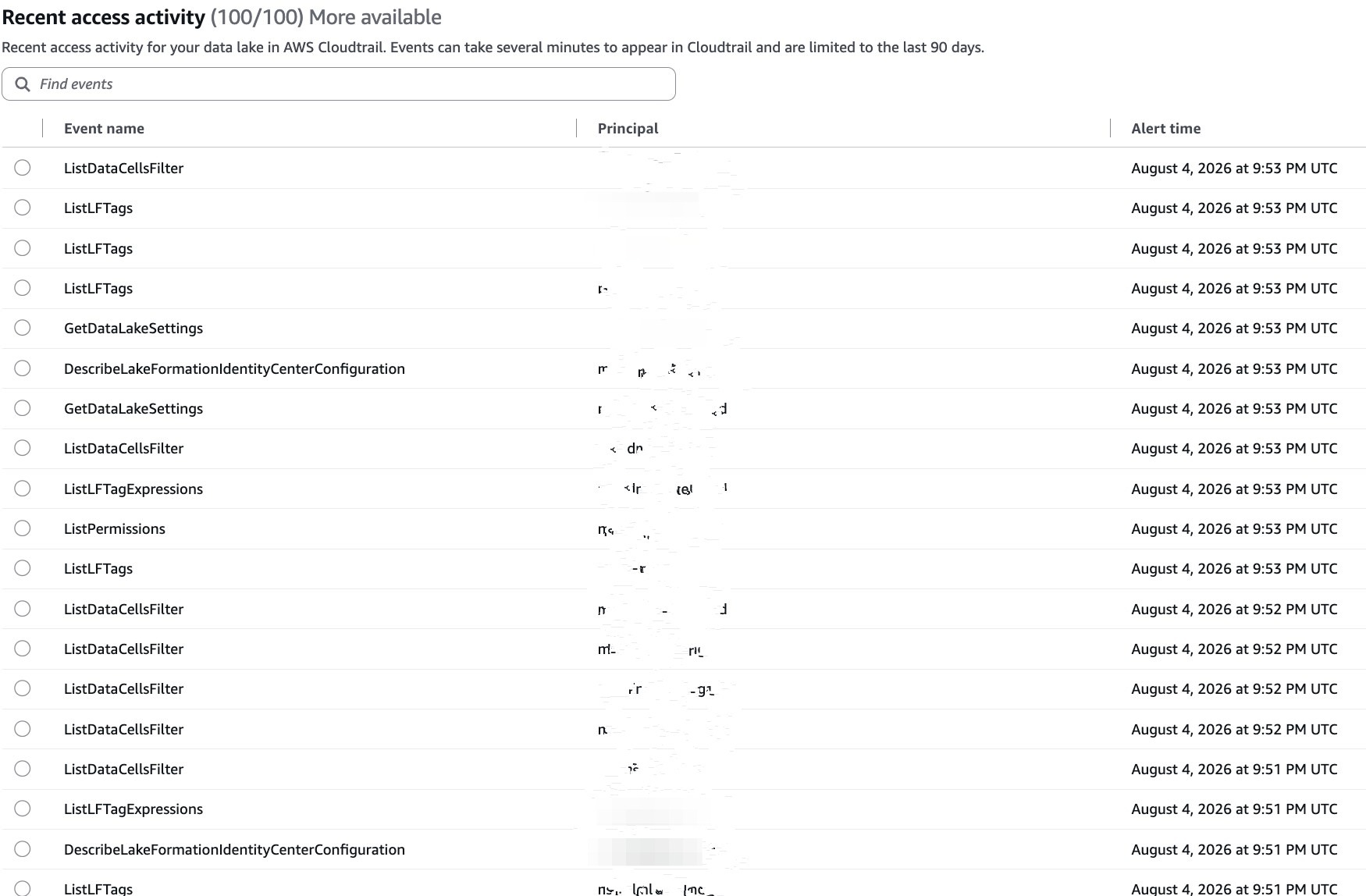
- The Dashboard, with a Recent access activity panel: who queried what, recently, across the lake.
- The Catalog view, where you click into any table or database and see its tags and grants directly.
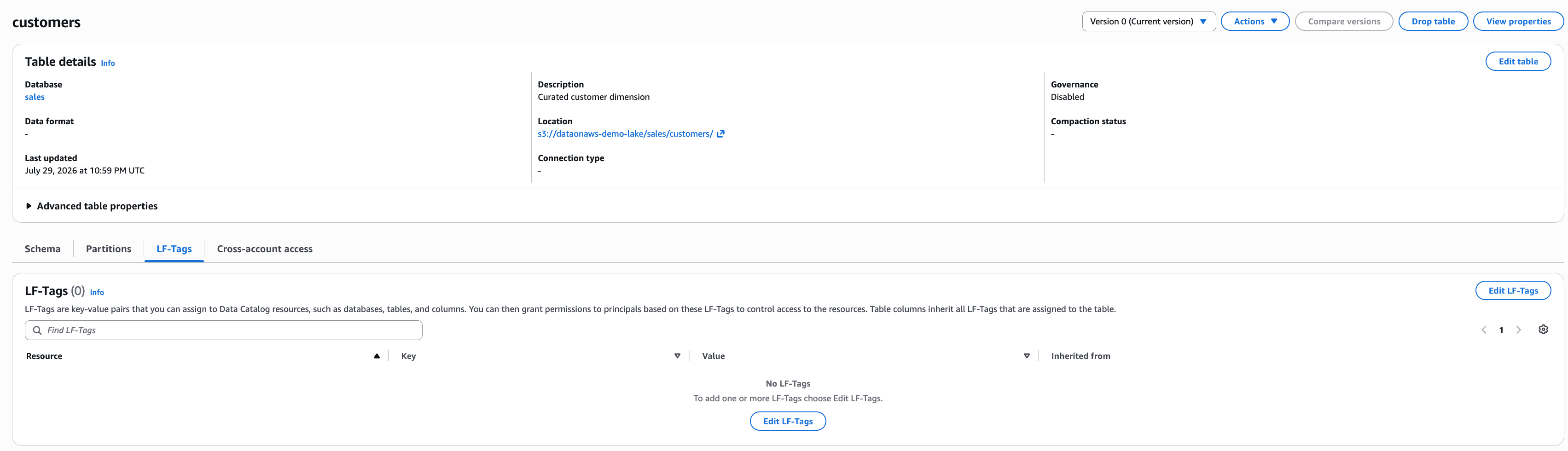
Same experience from the CLI, IaC, and SDK, if you’re integrating this into applications rather than clicking through console pages.
Reassuring point: needing more than the console is common. LF is the versatile backbone of AWS data governance, but it’s console-and-CLI-shaped. It may be seen too complex for non-technical people, and in most companies, non-technical people don’t get prod AWS console access anyway. So several products overlay this backbone with higher-level API/UI/UX: the open source data.all, and Amazon DataZone, whose capabilities now live on as SageMaker Catalog inside SageMaker Unified Studio. All of them orchestrate LF grants behind a simpler UX than the LF console. And plenty of customers (as always on AWS) build their own UI on top of LF instead.
What it costs
Lake formation itself is free. Table/column/row/cell permissions, LF-Tags, cross-account sharing is no charge, and no LF-side charge when Athena, Redshift, Glue or EMR enforce them (EMR Serverless bills extra for its enforcement mode, but that’s the EMR side, not LF). The one thing LF bills is its Storage API. It’s LF’s own filtering engine, which scans the data, applies the row/column/cell policy server-side, and returns already-filtered rows, charged per byte scanned (10 MB minimum, rounded up). Concretely, that’s the case when you (or a partner/ISV) are building your own query engine or connector rather than routing through Athena, Redshift, Glue, or EMR to have LF filter rows and columns server-side and hand you back the result, instead of vending you S3 credentials to filter yourself. Regular analytics users never touch this API directly; it exists for people building the engine, not querying through one.
Your AI agents are principals too
One forward note, because it’s where this is heading. An analytics agent aka an assistant that queries your data through Athena or a any engine is a principal like any other: a role, an identity, subject to the same grants. The column and row filters you wrote for humans apply unchanged when an LLM issues the query. Governance you already built is governance your agents inherit, which, as talk-to-your-data spreads, quietly becomes one of the strongest reasons to have centralized it here in the first place.
Some Useful Resources:
Get a second opinion before you ship.
A focused 30-minute review of your architecture, sizing, or rollout plan.
Get in touch →